In today’s blog post, we’ll look at How to Client Post Project on FreelancingPost.
Understanding What a Project Post Is:A project post is basically a job listing where you describe the work you want to get done. It includes details like the type of work, budget, timeline, and expectations. Freelancers read your project post and send proposals based on what you have written.
A clear and detailed project post helps you attract the right freelancers. On the other hand, a vague or incomplete post may lead to confusion, low-quality proposals, or no response at all.
Why Posting a Good Project Matters:Many clients think posting a project is just filling out a form, but it is much more than that. The quality of your project post directly affects the quality of freelancers you attract.
A well-written project:
- Saves time by filtering out unqualified applicants
- Attracts experienced and relevant freelancers
- Reduces miscommunication
- Helps you get better results
In simple terms, the better your project post, the easier your hiring process becomes.
Table of Contents
Step 1: Login to Your Account
Start by logging into your FreelancingPost account. Once you are on your Client dashboard, look for an option like “My Project.”
Read This Post for How To Create Account – Click Here
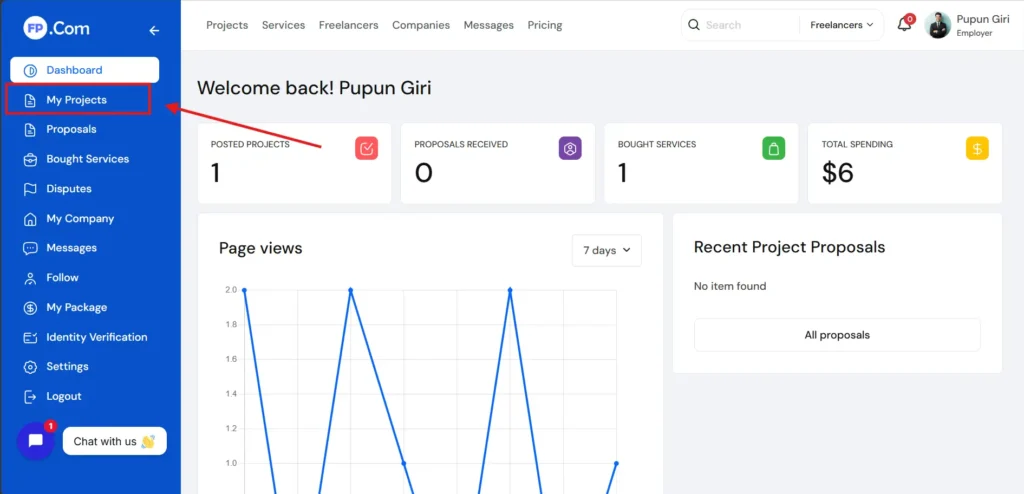
Click on it to begin creating your project listing.
Step 2: Project Creating
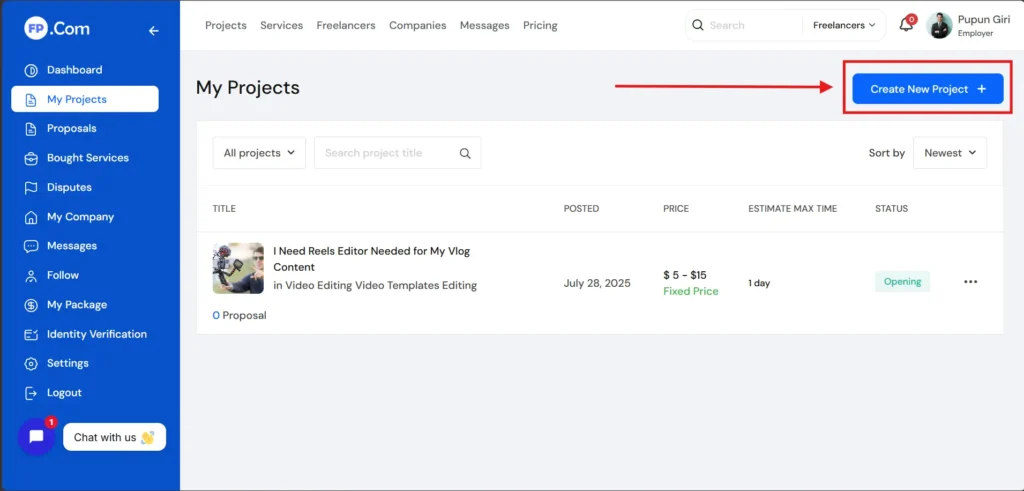
After clicking on my projects, you can then click on create new projects. If this is your first time posting, you may be asked to choose a plan. You can select the free plan and continue.
Step 3: Fill All Project Details
- Overview – Enter Project Tittle, Categories, Career Level, Languages, Project Description, Skill, etc
- Budget – Enter Your Project Budget
- FAQ – Enter Faqs
- Additional – Also Add Additional Deatils
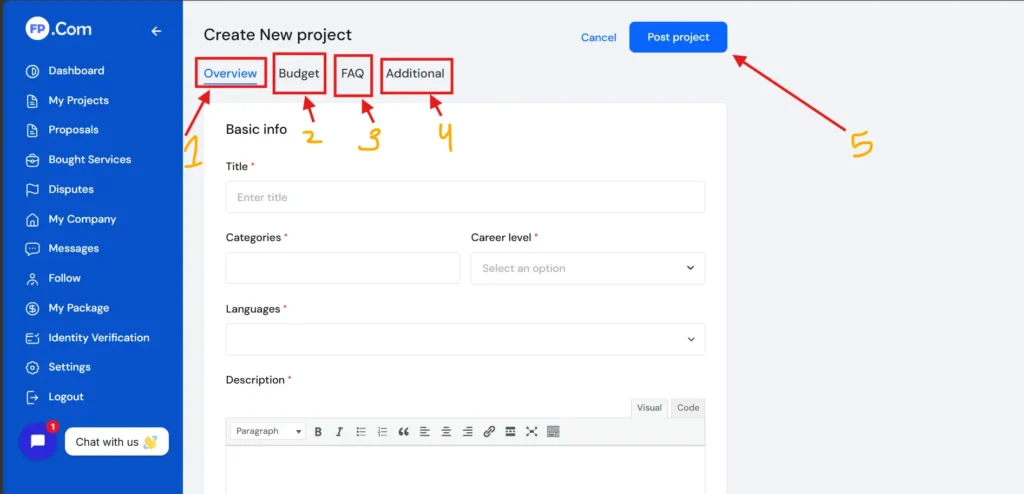
Review and Publish
Before publishing your project, review everything carefully.
Check:
- Title clarity
- Description quality
- Budget accuracy
- Skills selection
Once you are satisfied, click on the Post Project button.
Your project will now be live, and freelancers will start sending proposals.
What Happens After Posting a Project:
After posting your project, you will start receiving proposals from freelancers. Each proposal includes their introduction, experience, and pricing.
Take your time to review proposals carefully. Do not rush into hiring.
Look for freelancers who:
- Understand your project
- Have relevant experience
- Communicate clearly
You can also message them to discuss details before making a final decision.
Tips to Attract the Best Freelancers:
To get better results, keep these tips in mind:
- Write a clear and detailed description.
- Be honest about your budget and expectations.
- Respond to freelancers quickly.
- Be open to communication and suggestions.
A professional approach attracts professional freelancers.
Common Mistakes to Avoid:
Many clients make mistakes while posting projects. Avoid these to improve your hiring experience:
- Writing very short or unclear descriptions
- Not mentioning budget or timeline
- Choosing the wrong category
- Ignoring freelancer questions
- Rushing the hiring process
Avoiding these mistakes will help you find the right freelancer more easily.
Final Thoughts
Posting a project on FreelancingPost is simple, but doing it correctly makes a big difference. A well-written project post acts like a filter, bringing the right freelancers to you.
Take your time to clearly explain your requirements, set a fair budget, and communicate effectively. This will not only help you find the right talent but also ensure smooth project completion.
If you want to understand the full process in a practical way, don’t forget to watch this video:
If you have any doubt regarding this post, then comment in the comment box below and our team will answer your comments within a short time. Thank you for reading our post.
How to Freelancer or Clients Purchase Subscription Plan – Read Here
Frequently Asked Questions
-
What does it mean to post a project on FreelancingPost?
Posting a project on FreelancingPost means creating a job listing where clients describe their requirements, budget, and timeline to hire freelancers for specific work.
-
Is it free to post a project on FreelancingPost?
In most cases, yes. Clients can post projects for free, though some platforms may offer paid features for better visibility.
-
What details are required to post a project?
You need to provide a project title, detailed description, budget, deadline, required skills, and any attachments or references to help freelancers understand your needs.
-
How can I write an effective project description?
Be clear and specific about your requirements. Explain the scope of work, expected results, deadlines, and any special instructions. A detailed description attracts the right freelancers.
-
How do I set the right budget for my project?
Research similar projects and set a realistic budget based on complexity and quality expectations. A fair budget attracts skilled freelancers.