
In today’s blog post, we’ll look at How to Add Company on FreelancingPost – Step by Step Guide.
Why Adding a Company Profile is Important: Before jumping into the steps, it is important to understand why creating a company profile matters.

When freelancers browse projects, they often check who is posting the job. A company profile builds trust and shows that you are serious about hiring. It also gives your brand a professional identity on the platform.
A well-created company profile helps you:
- Build credibility and trust
- Attract experienced freelancers
- Showcase your business details
- Create a strong brand presence
- Manage projects more professionally
In simple terms, it makes you stand out from individual clients who may not provide complete information.
Who Should Add a Company Profile: Adding a company profile is useful for:
- Business owners
- Agencies
- Startups
- Teams managing multiple projects
Even if you are a small business, having a company profile can give you a professional edge.
Table of Contents
Step 1: Login to Your FreelancingPost Account
The first step is to log in to your account. Once you are inside your dashboard, look for options related to My Company
Read This Post for How To Create Account – Click Here
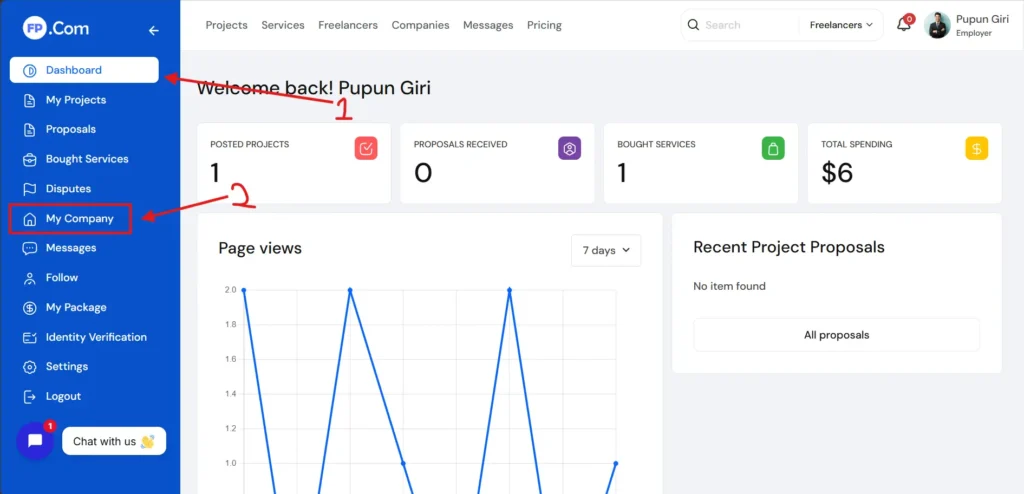
Step 2: Add New Company
After locating the company section, you will find an option like Add New Company.
Click on this option to open the company registration form.
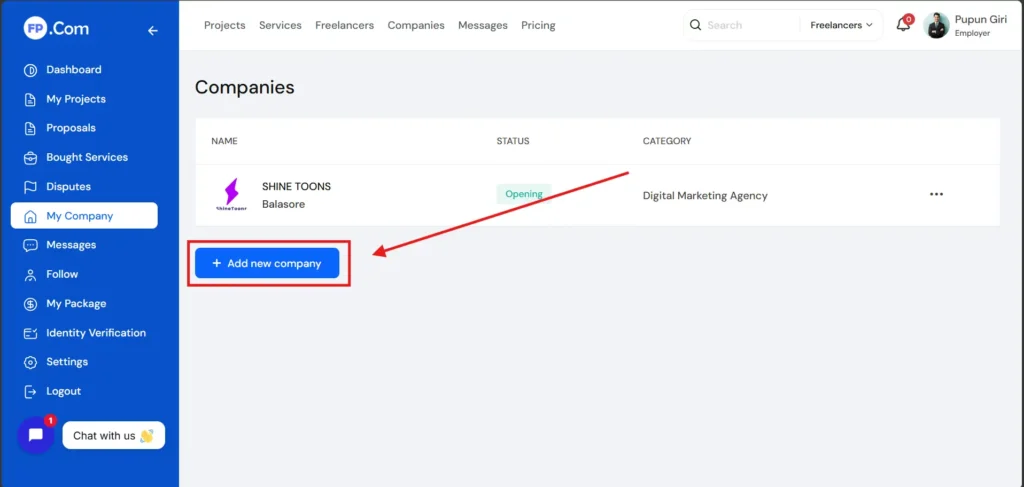
Enter Company Name
Start by entering your company name. Make sure it is:
- Accurate
- Professional
- Same as your official business name
Avoid using random or informal names. Your company name represents your brand, so it should be clear and trustworthy.
Add Company Logo
Uploading a company logo is very important. It gives your profile a professional look and helps freelancers recognize your brand.
Make sure your logo is:
- High quality
- Clear and readable
- Properly sized
Avoid blurry or stretched images. A good logo creates a strong first impression.
Write Company Description
This is one of the most important parts of your company profile. Your description should explain:
- What your company does
- Your industry
- Your services or products
- Your mission or vision
Keep your description simple and easy to understand. Avoid using complicated language.
For example, if you run a creative agency, you can explain that you provide services like video editing, animation, or design.
A clear description helps freelancers understand your business and decide whether they want to work with you.
Add Contact Information
You will need to provide basic contact details such as:
- Email address
- Phone number (if required)
- Location
Make sure all information is accurate. This helps build trust and allows freelancers to communicate with you easily.
Select Industry and Category
Choose the industry that best matches your business.
For example:
- Media and Entertainment
- IT and Software
- Marketing and Advertising
Selecting the correct category helps your company profile reach the right audience.
If you have a website or social media pages, you can add them to your profile.
This adds credibility and allows freelancers to learn more about your business.
However, make sure your links are active and professional. Avoid linking incomplete or inactive pages.
Upload Additional Details (If Required)
Some platforms may ask for additional information such as:
- Company size
- Years of experience
- Team details
Fill these details honestly. They help create a more complete and trustworthy profile.
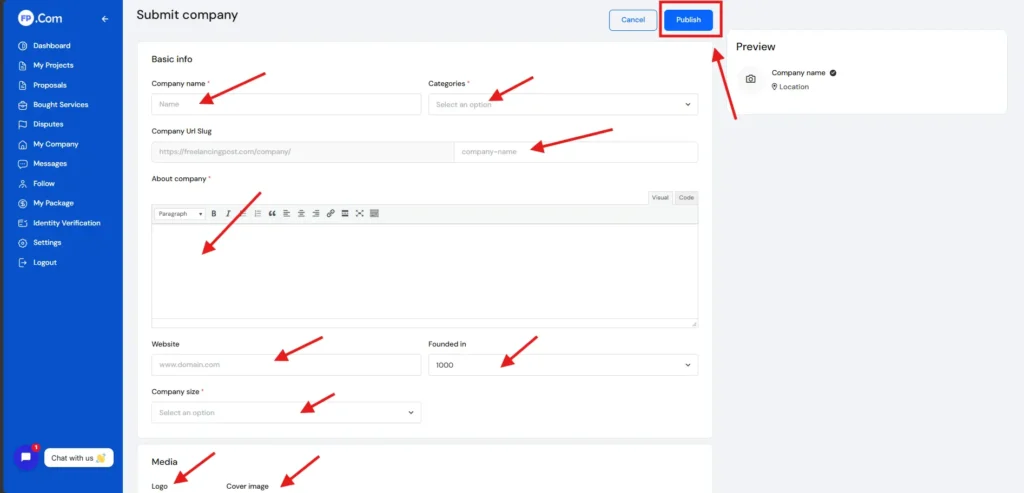
Review and Submit
Before submitting your company profile, review all the information carefully.
Check for:
- Spelling mistakes
- Correct details
- Proper formatting
Once everything looks good, submit your profile.
Your company profile may go live immediately or after a short review process.
Final Thoughts
Adding a company profile on FreelancingPost is not just a basic step. It is an important move toward building a professional identity on the platform.
Take your time to fill in all the details carefully and present your business in the best possible way. A strong company profile builds trust, attracts skilled freelancers, and improves your overall experience.
If you want to understand the full process step by step, don’t forget to watch this video:
If you have any doubt regarding this post, then comment in the comment box below and our team will answer your comments within a short time. Thank you for reading our post.
How to Client Post Project – Read Here
Frequently Asked Questions
Click to View All Faqs
-
What does it mean to add a company on FreelancingPost?
Adding a company on FreelancingPost means creating a business profile where you can represent your brand, post jobs or services, and connect with freelancers or clients professionally.
-
Is it free to add a company on FreelancingPost?
Yes, in most cases, adding a company profile on FreelancingPost is free. You can create and manage your company account without paying any registration fee.
-
What details are required to create a company profile?
You need to provide basic information such as company name, logo, description, industry, contact details, and website (if available). Adding complete details helps build trust.
-
Can I edit my company profile after creating it?
Yes, you can edit your company profile anytime. You can update your details, logo, description, and contact information whenever needed.
-
Do I need a website to add a company?
No, having a website is optional. However, adding a website link can increase your credibility and help people learn more about your business.