How to Post Gig/Services on Freelancing Post (Complete Beginner’s Guide) : In today’s blog post, we’ll look at how you can add Gigs or Services to your freelancing posts.
Understanding What a Gig or Service Is: Before creating a gig, it is important to understand what it actually means. A gig is basically a service that you offer to clients. It clearly explains what you will do, how you will do it, and what the client will get in return.
For example, instead of saying “I do video editing,” a gig would say “I will edit professional YouTube videos with high-quality transitions and effects.” This makes your service clear and attractive.
A good gig is not just about writing something quickly. It is about presenting your skills in a way that solves a client’s problem.
Step 1: Login On Your Dashboard:
First you need to login to your freelancer account and go to the Dashboard and next you need to click on My Services and go to the Add Gig/Services section. For more information, see the image given below.
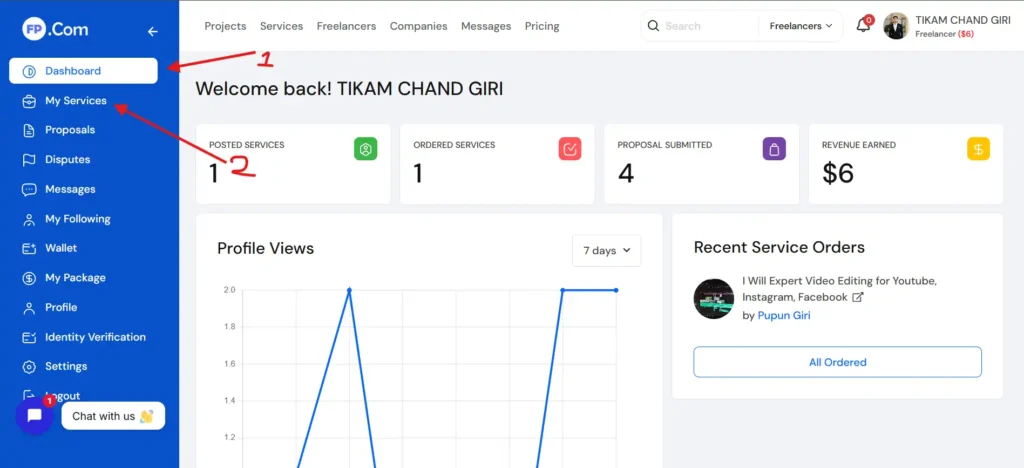
Note : When you are going to add Gig/Services for the first time, maybe then you will be asked to take New Packages or Plan, you can then take free or paid plan as per your requirement.
Step 2: Create Your Gig/Services:
If you have already taken the plan, then you can now add Gig/Services by clicking on Create New Services.
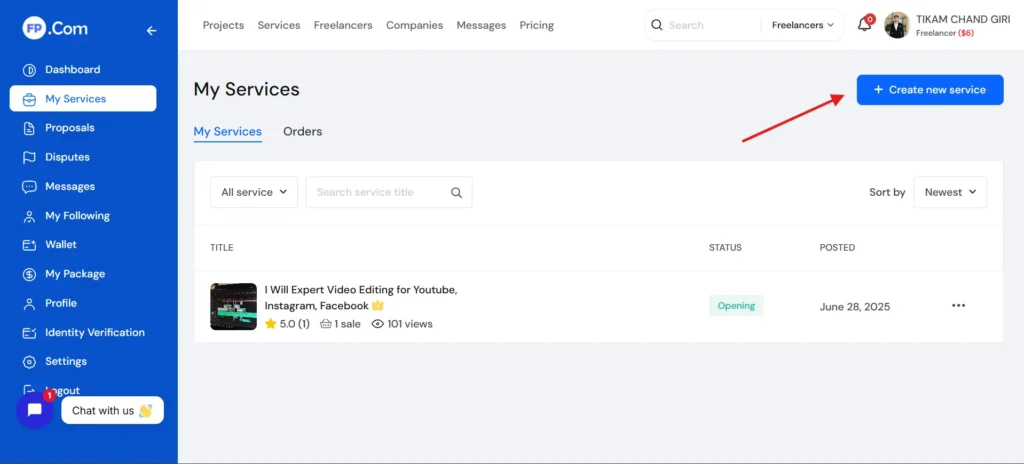
Step 3: Add Your Gig/Services All Deatils:
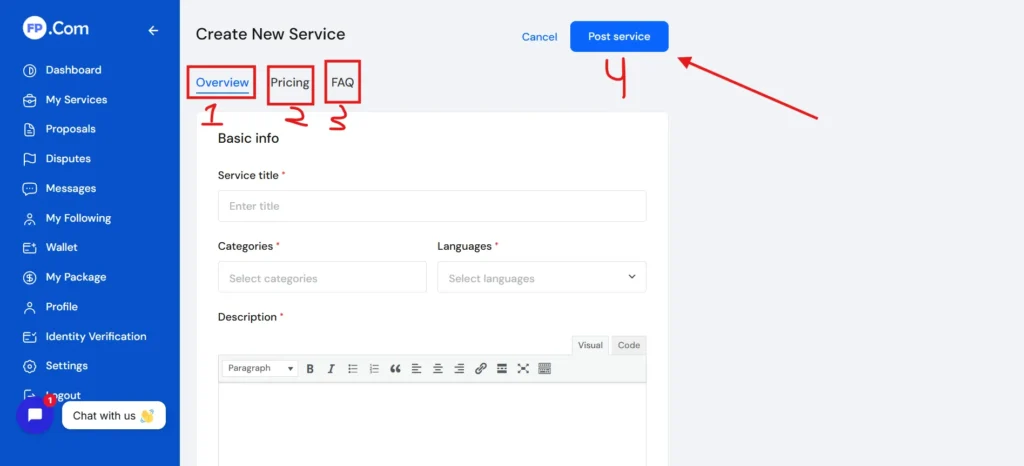
Click on it and you will see a form where you need to fill in all the details about your service. Take your time here because this is the most important part.
- Overview – Write a Powerful Gig Title, Choose the Right Category, Create a Detailed Description, Etc
- Pricing – Pricing is very important, especially for beginners. If you are just starting, keep your prices reasonable so you can attract your first clients.
- FAQs – Most Add
- Creating a gig is easy, but making it successful requires effort. Here are some important tips:
- Focus on one service instead of offering everything in one gig. A clear and focused gig performs better.
- Use simple language so clients can understand quickly. Avoid overcomplicating your description.
- Update your gig regularly based on performance. If you are not getting orders, try improving your title or description.
- Add high-quality portfolio samples. This builds trust and shows your real skills.
- Stay active on the platform. The more active you are, the better your chances of getting noticed.
Common Mistakes to Avoid
Many beginners make similar mistakes while posting gigs. Avoid these to improve your chances:
- Writing very short or unclear descriptions
- Using generic titles
- Adding too many unrelated tags
- Not uploading portfolio samples
- Copying content from other freelancers
Your gig should always be original and focused on your strengths.
Final Thoughts
Posting a gig on Freelancing Post is one of the most important steps in your freelancing journey. A well-created gig acts like your salesperson, working for you 24/7 to attract clients.
Take your time to create a clear, professional, and client-focused gig. Do not rush the process. The effort you put into your gig will directly affect your results.
If you want to understand the full process in a practical way, make sure to watch this video: